XSLT Stylesheets
Lesgeld
Cursus XSLT Stylesheets
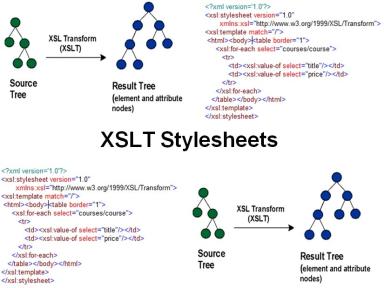
In de cursus XSLT Stylesheets leer je alles over de transformaties van XML naar verschillende formaten, waaronder HTML, andere XML-documenten en zelfs platte tekst of JSON. Deze cursus biedt een uitgebreide basis voor het begrijpen en toepassen van XSLT in diverse projecten.
XSLT Transformaties
De cursus gaat dieper in op de specifieke transformaties van XML naar HTML, XML naar XML en van XML naar andere tekstformaten zoals platte tekst en JSO
Cursus XSLT Stylesheets
In de cursus XSLT Stylesheets leer je alles over de transformaties van XML naar verschillende formaten, waaronder HTML, andere XML-documenten en zelfs platte tekst of JSON. Deze cursus biedt een uitgebreide basis voor het begrijpen en toepassen van XSLT in diverse projecten.
XSLT Transformaties
De cursus gaat dieper in op de specifieke transformaties van XML naar HTML, XML naar XML en van XML naar andere tekstformaten zoals platte tekst en JSON. Deze vaardigheden zijn essentieel voor iedereen die met XML werkt.
XPath Expressies
Verder wordt aandacht besteed aan het navigeren door XML-documenten via XPath-expressies. Je leert de verschillende zoekassen van XPath en hoe je deze effectief kunt toepassen binnen je XSLT-projecten.
XPath Functies
Ruime aandacht is er voor de vele functies die XPath en XSLT bieden. Deze functies kunnen tijdens het transformatieproces worden aangeroepen om complexe bewerkingen uit te voeren.
XSLT Template Matching
Een belangrijk element van de cursus XSLT Stylesheets is het principe van template matching, dat het centrale element van de cursus vormt. Dit helpt je om gerichte transformaties uit te voeren op basis van de structuur van je XML-documenten.
XSLT Flow Control
De XSLT-elementen die verband houden met flow control worden grondig besproken. Je leert ook hoe je elementen kunt kopiëren en manipuleren tijdens de transformaties.
Generieke Templates
Voorts komt het gebruik van generieke templates aan de orde, evenals het toepassen van apply-templates. Ook named templates en het aanroepen daarvan met call-template worden uitgebreid behandeld.
XML naar XML Transformatie
De transformatie van attributen naar elementen en vice versa passeert eveneens de revue. Tenslotte wordt gekeken naar transformaties van XML naar diverse andere formaten, wat de cursus nog waardevoller maakt.
PDF Transformatie
In dit opzicht is er een aparte module gewijd aan de transformatietaal XSL-FO. Je leert hoe je XSLT kunt gebruiken om transformaties naar PDF uit te voeren, wat essentieel is voor professionele documentgeneratie.
Voor meer informatie over XML en aanverwante onderwerpen, bekijk ook onze cursus XML Introductie om je basiskennis verder uit te breiden.
Doelgroep van de cursus XSLT Stylesheets
De cursus XSLT Stylesheets is bedoeld voor applicatieontwikkelaars, webontwikkelaars en projectmanagers die XSLT willen leren om XML-opmaak en -transformatie toe te passen.
Voorkennis cursus XSLT Stylesheets
Kennis van de syntaxis van HTML en XML is vereist. Kennis van de basisconcepten van programmeren is niet vereist, maar wel nuttig.
Training XSLT Stylesheets
De theorie wordt besproken aan de hand van presentatieslides. De theorie wordt verduidelijkt met behulp van demo's en afgewisseld met oefeningen. Het cursusmateriaal is in het Engels. De cursustijden zijn van 9.30 uur tot 16.30 uur.
Certificering XSLT Stylesheets
Deelnemers ontvangen een certificaat van deelname aan XSLT Stylesheets na succesvolle afronding van de cursus.
Modules
Module 1 : XSL Intro
- The XSL Family
- What is XSLT?
- What is XPath?
- XSL's Position
- XSLT Stylesheets
- XSLT Versions
- StyleSheet Blueprint
- The XSLT Vocabulary
- Template Rules
- Default Templates
- XSLT Document Structure
- xsl:output
- XSLT Processors
- Processors Implementations
Module 2 : Transformation to HTML
- Adding Stylesheets
- Extracting Values from XML
- Navigating the XML Document
- Using Predicates
- Iterating through XML Elements
- Creating HTML Tables
- Absolute and Relative Path
- Conditional Processing
- Accessing Document Parts
- ..// Operator
- Access XML Data with Nodelists
- Internal hyperlinking
- Numbering
- Sorting
Module 3 : XPath
- XPath Expressions
- XPath Node Types
- XPath Context
- Location Path Syntax
- XPath Axes
- Predicates
- XPath Operators
- XPath Functions
- Node Tests in XPath
- XML Schema Data Types
- Sequences
- For Expressions
- Conditional Expressions
- Namespace Nodes
Module 4 : XSLT Variables
- xsl:variable
- xsl:variable with Subtree
- Working of xsl:variable
- Variable Scope
- Global Variables
- Changing Variables
- Tracing Output
- xsl:param
- Passing Parameters to Templates
- Named Templates
- Calling Templates
- Call by Reference
Module 5 : XSLT and XPath Functions
- Numeric Functions
- String Functions
- Boolean Functions
- Accessor Functions
- Node Functions
- Sequence Functions
- Any Uri Functions
- Context Functions
- Duration and Time Functions
- Error and Trace Functions
- QName Functions
- Regular Expression Functions
Module 6 : Transformation to XML
- Transformation Language
- xsl:element
- Selecting all Elements
- Selection all Attributes
- name function
- xsl:attribute
- Copying Elements
- Generalization
- Multiple Applicable Rules
- mode attribute
- xsl:include
- xsl:import
Module 7 : Transformation to Text
- Text Formats
- Plain Text Files
- CSV files
- Transforming JSON
- Handling Entity References
- White Space Handling
- xsl:space
- Preserving space
- xsl:preserve-space
- Stripping Space
- xsl:strip-space
Module 8 : Advanced XSLT
- Using Typing
- Strong Typing
- XML Schema Validation
- Temporary Trees
- User-Defined Functions
- Grouping by Value
- Grouping in Sequence
- Multiple Result Trees
- Output Serialization
- Character Mapping
- Character Substitutions
Module 9 : XSL-FO
- What is XSL-FO?
- XSL-FO Documents
- Layout Master Set
- Page Sequence Masters
- Page Template Layout
- XSL-FO Areas
- XSL-FO Pages
- Static Content
- Flows
- Page Sequences
- Tree for Pagination
